Ugly Christmas sweater designs with AI: motifs, colours and a print file
Design an ugly Christmas sweater with AI: pick motifs, limit the colours, mock up the front and make a print file. Plus why a knitter still has to chart it.
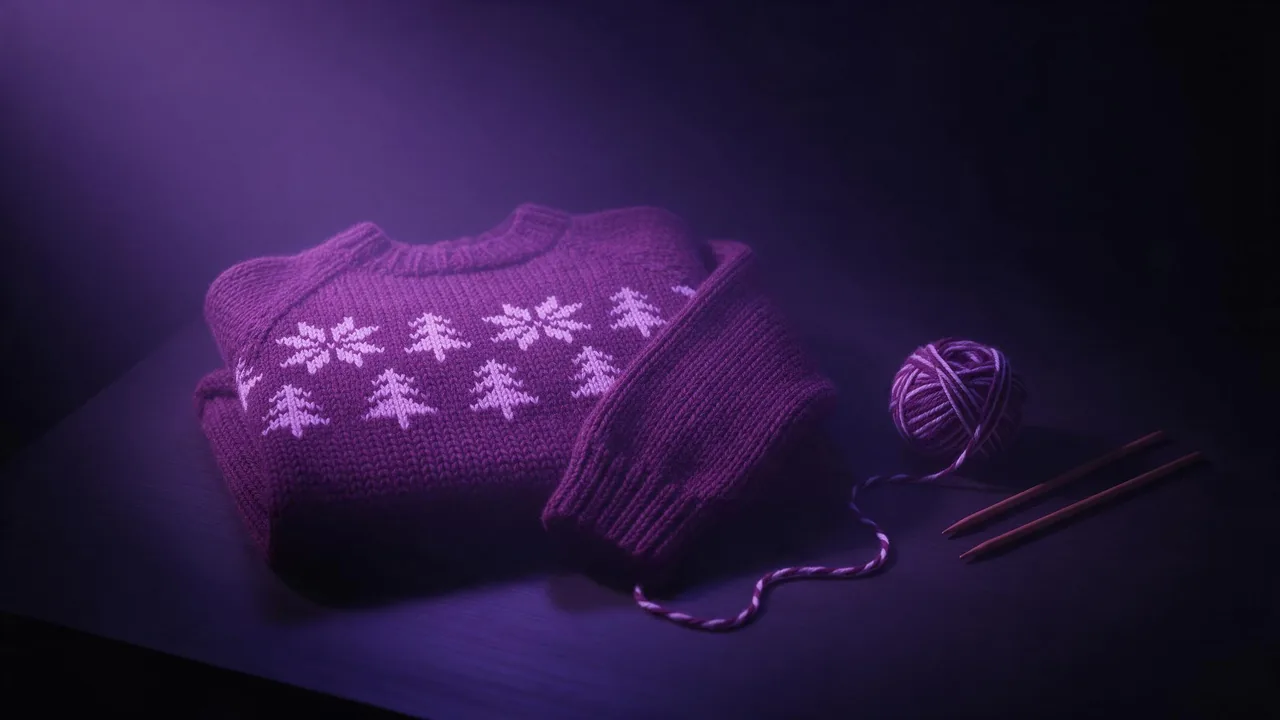
An ugly Christmas sweater is a design problem dressed as a joke. The joke only lands when the pattern reads from across a room: big motifs, few colours, a border that repeats, and one silly centrepiece. That is exactly the kind of image a generator is good at drafting, as long as you know which part it can hand you finished and which part it cannot.
This walkthrough follows one design from idea to file in the studio: a team sweater for an office party, with a reindeer wearing sunglasses on the chest. It ends at two places. One is a print-on-demand shop, which wants a flat image. The other is a knitter, who wants a chart, and that is where the honest limit comes in.
Pick three motifs and one joke
Classic sweaters are built from a small vocabulary: snowflakes, pine trees, reindeer, stars, candy canes, a zigzag or diamond border. Choose three of them for the repeat and one centrepiece that carries the joke. More than that and the front turns into noise, which is the wrong kind of ugly. Write the list down before you prompt, because every later step reuses it word for word.
- Border: a zigzag band above the ribbed hem and at the cuffs.
- Repeat: small snowflakes and pine trees in alternating rows.
- Centrepiece: a reindeer in sunglasses, front-facing, large and simple.
Hold the colour count down
Real knitwear uses few colours because each one is a separate yarn carried across the back of the work. Three or four reads as knitted; ten reads as a printed photo of a sweater. Name the colours in the prompt and name how many there are, then say what is not allowed. The colour palette guide has the wording that keeps a model inside a palette.
Words that make it look knitted
Without texture words, a model draws a flat cartoon on a jumper shape. A handful of knitting terms change that: they push the image toward visible stitches, wool fibre and a pattern that sits on a grid. The texture and material words post covers the general idea; for knitwear these carry the most weight:
- Stranded colourwork or Fair Isle style: patterns built from small blocks, two colours per row.
- Intarsia: one large motif in its own colour, the right word for the centrepiece.
- Visible V-shaped stitches, chunky wool, slight fuzz: the surface you would feel.
- Ribbed hem and cuffs, crew neck: the details that make it a sweater, not a panel.
Mock up the front panel
Start with the front laid flat, not a person wearing it. A flat lay shows the whole design without folds or arms in the way, and it skips the question of faces. Draft on Still, from €0.40 a render, and make a few variations before you settle.
Flat lay of a chunky knitted Christmas sweater, front view, centred on a plain dark background. Stranded colourwork in exactly four colours: deep red, forest green, cream and black. Zigzag border above the ribbed hem, rows of small snowflakes and pine trees, a large intarsia reindeer wearing black sunglasses on the chest. Visible V-shaped stitches, slight wool fuzz, even soft light. No text, no letters, no extra coloursWant words on it, like a team name? Leave them out of the render and add them in a design tool. Knitted lettering is where models fail most often, and a misspelled name on twenty sweaters is a costly joke. The same advice runs through the holiday cards guide.
Turn it into a print-on-demand file
Print-on-demand sweaters are printed, not knitted, so the printer wants a flat design, not a photo of a garment. Ask for the pattern itself: the motifs on a plain knitted ground, filling the whole frame edge to edge, seen straight on with no shadows and no sweater outline. That is your all-over-print artwork.
Seamless knitted pattern filling the whole frame, seen straight on, flat and evenly lit. Stranded colourwork in deep red, forest green, cream and black only. Alternating rows of small snowflakes and pine trees, a zigzag band along the bottom edge. Visible knit stitches, no garment shape, no shadows, no textThen check three things. First, size: Still renders up to 2K, and an all-over print on a large sweater often needs more, so compare with the template your print shop gives you and use an upscaler from the models page if it falls short; the upscaler guide explains which kind keeps the stitches intact. Second, the repeat: a prompt that says seamless does not guarantee a tile, so offset the image by half its width and height in an editor and look for a visible seam. Third, the centrepiece: place the reindeer on the front panel of the template yourself, so it sits on the chest and not under an arm.
The honest limit: a picture is not a chart
If the sweater is to be really knitted, the render is a mood board, not a pattern. A knitting chart is a grid where every square is one stitch in one colour, sized to a gauge and a garment size. A generated image only looks like stitches: rows drift, a motif can be eleven stitches wide on one side and twelve on the other, and colours blend at the edges where yarn never would. Nobody can knit it square by square.
- What to hand a knitter: the mock-up for the look, the motif list and the exact colours.
- What the knitter does: charts each motif on a grid at their gauge, counts the repeat to fit the stitch count, and picks yarns.
- What the studio cannot do: produce a stitch-accurate chart, count stitches or check that a repeat divides evenly.
Selling the print version as well? A matching shop banner or listing cover comes from the same palette and motifs; the gift guide cover set shows how to build one. Otherwise, open the studio and render the flat-lay front first: once that reads well from across the room, everything else follows from it.
Domande
Can AI make a knitting chart for my Christmas sweater?
Not a usable one. A generated image imitates stitches but does not keep a true grid, so rows and motif widths drift. Use the image as the design reference and have a knitter chart it on graph paper or in charting software.
How many colours should an ugly sweater design have?
Three or four. That is what real stranded knitting uses, and it keeps the design readable from a distance. Name the exact colours and the count in the prompt.
Can I put a name or a slogan on the sweater?
Yes, but add it yourself in a design tool. Knitted-looking lettering is one of the things models most often get wrong.